iPhone • iPad • Apple Watch

Park data that’s actually readable in the parks.

ParkScope combines live waits, attraction status, reliability insights, and park-day tools into one clean interface built for real use in the middle of a busy day.

Live waits & status
Reliability-focused detail pages
Visit & queue tracking tools
Apple-first experience
Built for park days
Quick scanning, less clutter

ParkScope is designed to surface what matters fast, without forcing users through noisy screens.

Apple ecosystem support
iPhone, iPad, Apple Watch

A consistent experience across Apple devices, with more capabilities unlocked through Pro.

ParkScope iPhone dashboard screenshot
iPhone Dashboard
Live waits, park cards, and quick park-day tools
Pro ready
Widgets, Live Activities, and automatic logging support
No account required
Start using ParkScope without creating a separate account.
iCloud-friendly
Supported data can sync across your Apple devices with iCloud enabled.
System status available
Check ParkScope system health and data-source status anytime.

Features

A cleaner way to use park data

ParkScope is built around clarity, consistency, and speed, so users can make better decisions without fighting the clutter.

Designed for in-park use

Live waits and attraction status

See current wait times and clear operating status labels for attractions in a format built for quick in-park reading.

Reliability insights

View reliability-focused attraction details, including downtime patterns and historical context to help with planning.

Park dashboards

Get a park-level snapshot with waits, status counts, and supporting park-day context in one consistent layout.

Dining and park tools

Use the same clean interface across park content pages so moving between attractions and other park tools feels seamless.

Search and browse

Quickly find attractions and jump into park or ride detail pages without digging through cluttered menus.

Visits and queue tracking

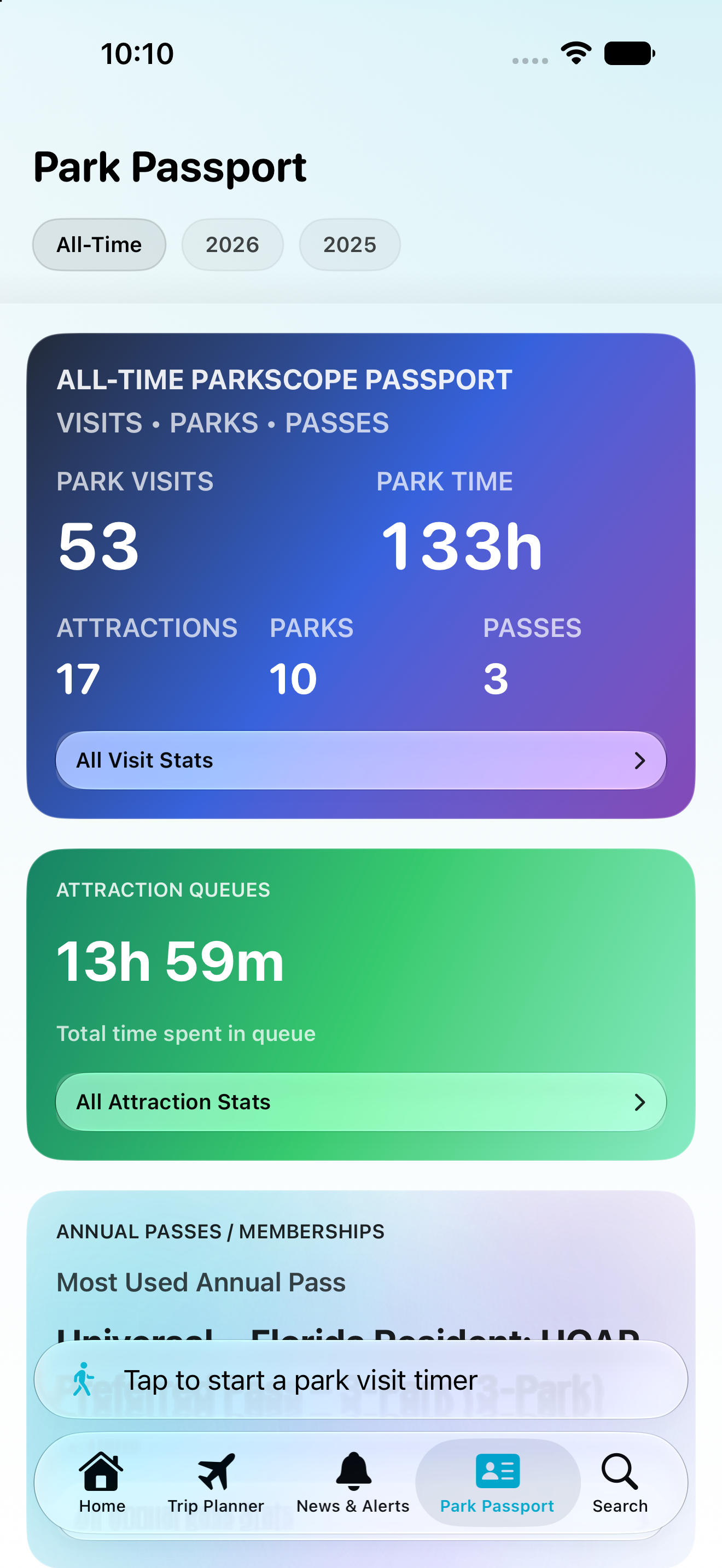
Log park visits and queue sessions, then review your history over time from a calendar-style experience.

Screens

A quick tour of ParkScope across devices

The same ParkScope visual language carries across iPhone, iPad, and Apple Watch so users always know where to look.

ParkScope iPhone dashboard showing park cards and wait time summaries
ParkScope park page with attraction list and park details
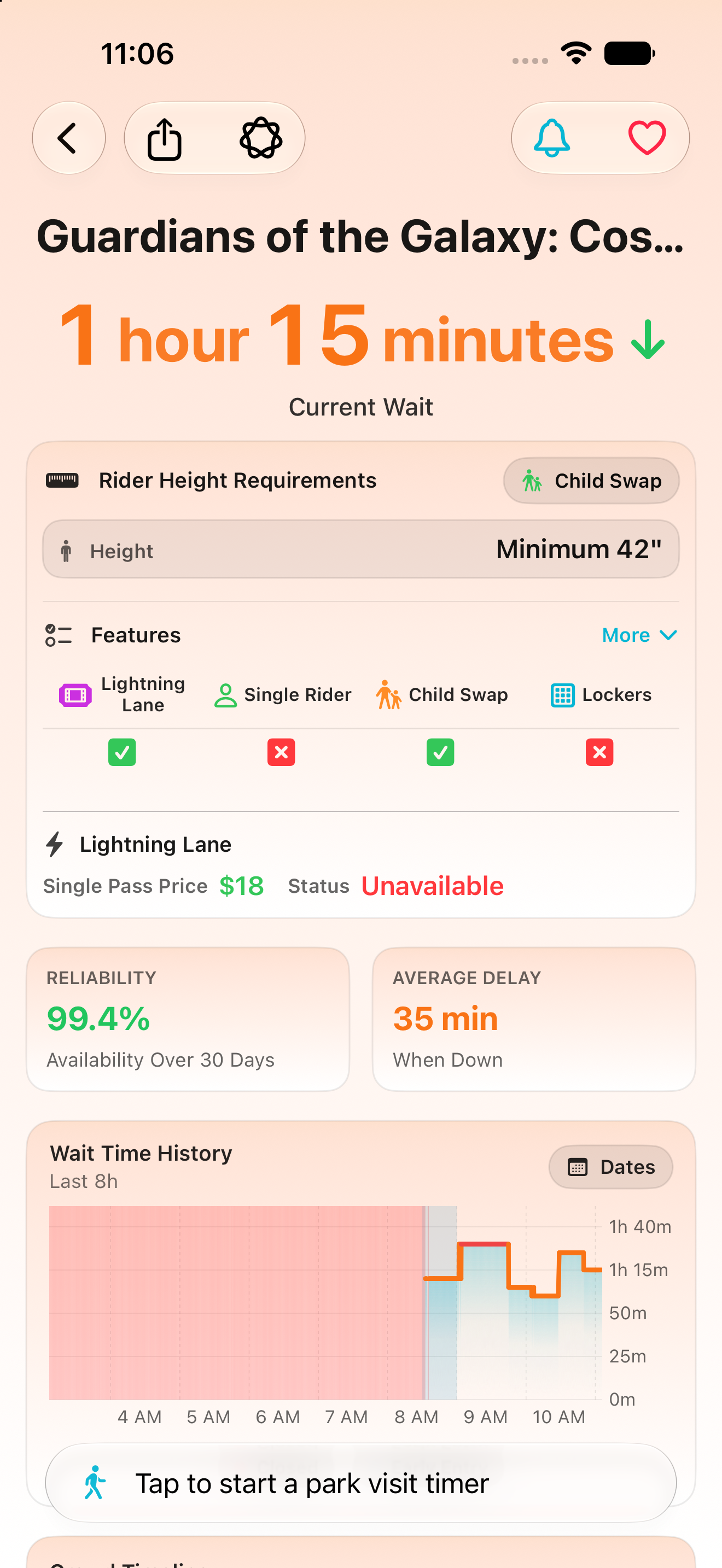
ParkScope attraction detail view with reliability and wait charts
ParkScope attraction detail view showing downtime predictions
ParkScope attraction detail view shwoing reliability and wait time data
ParkScope showing annual pass combined blackout calander
ParkScope park passport and visit tracking account
Fast park checks
Open, scan, decide

ParkScope keeps live waits, attraction status, and park dashboards easy to read when users are already moving through the park.

More than wait times
Reliability context included

Attraction pages pair current status with reliability-focused details so users can plan with more context than a single wait number.

Built for Apple devices
Consistent across screens

The app experience carries across iPhone, iPad, and Apple Watch, with additional supported Apple platform features available through Pro.

ParkScope app icon

Upgrade

ParkScope Pro

ParkScope Pro unlocks premium tools for users who want more automation, more Apple platform features, and deeper insight into attraction reliability and park-day trends.

Designed for users who want ParkScope working with them all day

Pro is focused on glanceable information, automatic logging workflows, Live Activities, widgets, and advanced insight views while keeping the same clean core experience.

Plans
Monthly • Annual • Lifetime
Pricing is shown in-app and managed by Apple
Family Sharing

Family Sharing support is available where eligible through Apple subscriptions.

Device and feature availability

Some Pro capabilities depend on device support, Apple OS version, and feature rollout status.

Pro highlights

Widgets
Glanceable park info on supported Home and Lock Screen widget surfaces.
Live Activities
Live queue and park-session updates on supported iPhone devices.
Automatic logging tools
Pro unlocks automatic park visit and queue logging workflows.
Advanced reliability tools
Deeper insight views for downtime and attraction reliability trends.
Premium Apple ecosystem features
Additional Apple platform integrations where supported.
Ongoing Pro feature expansion
ParkScope Pro continues to grow with new premium tools over time.

Why upgrade

What Pro adds to a park day

Premium park-day tools
On the go
Keep park context visible

Use supported widgets and Live Activities to keep important park-day information closer to where you already look.

Less manual work
Let ParkScope help log the day

Automatic visit and queue logging workflows help build a cleaner record of your park activity when supported.

Better planning context
Understand attraction reliability

Advanced reliability views add more context around downtime patterns and attraction trends.

Apple-first
More premium platform tools

Pro expands ParkScope with deeper Apple ecosystem features across supported devices and OS versions.

Free vs Pro

Free
Pro
Live wait times & attraction status
Park dashboards
Attraction detail pages
Manual park visit & queue logs
Basic notifications
Automatic park visit & queue logging
Live Activities (supported devices)
Widgets
Advanced reliability insights
Additional premium park-day tools

Feature availability may vary by device, OS version, park support, and app version. Purchases and subscriptions are managed by Apple.

FAQ

Quick answers

Which parks are supported?

ParkScope focuses on major Florida theme park destinations, including Walt Disney World Resort, Universal Orlando Resort, SeaWorld Orlando, LEGOLAND Florida, and Busch Gardens Tampa Bay. Coverage can expand over time, and some features may vary by park.

How often does data update?

Park data is typically refreshed about every 45–60 seconds when source feeds are active. Update timing can vary slightly based on park data availability.

Do I need an account to use ParkScope?

No account is required to use ParkScope. Core app data is designed to work without a separate ParkScope login.

Does ParkScope sync across my Apple devices?

If iCloud is enabled on your device, ParkScope can sync supported data across your Apple devices automatically.

Does ParkScope use my location?

Location is optional. Some features (such as nearby park tools and certain visit/queue workflows) can use location, but the app still works without it.

Where does the wait-time and status data come from?

ParkScope uses park-provided/publicly available operational data sources and presents it in a cleaner format. Like any park app, the displayed data depends on the accuracy and timing of the source feeds.

What is the difference between Free and Pro?

Free includes the core park-day experience (live waits, park dashboards, and manual logging tools). Pro unlocks premium features such as automatic logging workflows, widgets, Live Activities, and advanced insights.

How much does ParkScope Pro cost?

ParkScope Pro pricing is shown in the app and managed by Apple through the App Store. Available plan options and pricing can change over time.

Is Apple Watch supported?

Yes. ParkScope includes Apple Watch support, with some features and premium capabilities depending on your device and subscription level.

Does ParkScope work on Android?

No. ParkScope is currently built for the Apple ecosystem (iPhone, iPad, Apple Watch, and supported Apple platform features).

How do I get help or report an issue?

Use the Support page for help, troubleshooting, or feedback. You can also check System Status for service and data-source health updates.

Ready

Bring ParkScope to your next park day

Download ParkScope for live waits, attraction status, reliability-focused tools, and a cleaner park-day experience across Apple devices.

Need help before downloading?

Check Support for FAQs and help resources, or use System Status if you want to verify data-source health first.

Apple, iPhone, iPad, Apple Watch, CarPlay, and related marks are trademarks of Apple Inc.